Maintain HIPAA compliant care plans without expensive software.
You do not need expensive software or monthly cloud subscriptions to stay HIPAA-compliant. Thousands of nursing facilities safely use ordinary Microsoft Word documents (or the free program LibreOffice) saved in folders on a secure computer or small server inside the building. This guide explains how to do it correctly — in everyday language.
What HIPAA Actually Requires
HIPAA only has three big rules for electronic patient information:
- Only the right people can see or change it.
- If someone steals the computer, they still can’t read the files.
- You keep track of who opened or changed a file (in case you ever need proof).
That’s it. You can meet all three with tools almost every facility already has.
The Simple, Proven Setup
One dedicated Windows computer (or small server) sits in a locked office or closet. On that computer you create folders like this:
Secure Care Plans (entire drive encrypted with BitLocker)
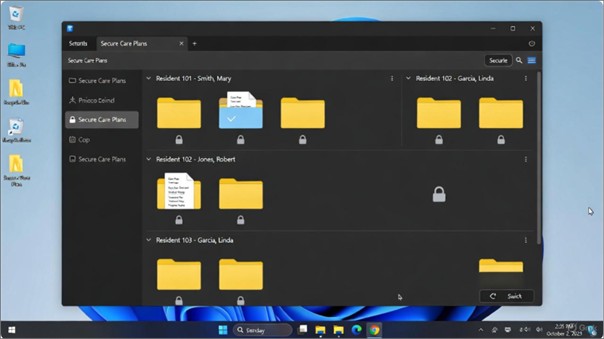
- Everyone logs in with their own Windows username and password.
- The screen automatically locks after 5 minutes of no activity.
- The whole hard drive is encrypted with BitLocker (free in Windows Pro/Enterprise).
- Only the nursing team has permission to open the “Secure Care Plans” folder.
This setup meets HIPAA requirements.
One-Afternoon Setup (Your IT Person or Consultant Does This)
- Use an existing Windows computer or buy one ($600–$1,200).
- Turn on BitLocker (Control Panel → System and Security → BitLocker → Turn On). Print the recovery key and lock it in the safe.
- Create the main folder “Secure Care Plans.”
- Right-click → Properties → Security → remove “Everyone” and add only the nursing group/accounts.
- Create a sub-folder for each resident (use ID number or last name).
- Save care plans as regular Word files inside each resident’s folder.
- Optional (extra safety): password-protect each Word file (File → Info → Protect Document → Encrypt with Password → use a strong password).
- Set the screen saver to lock after 5 minutes (Control Panel → Appearance → Screen Saver).
That’s all. You are now HIPAA-compliant.
How Nurses Use It Every Day
- Double-click the resident’s folder → open the care plan → type updates → Save.
- When a surveyor or family member needs to see a plan, you open it in seconds.
- No internet required, no monthly fees.
What About Using LibreOffice Instead of (or Alongside) Microsoft Word?
LibreOffice is a free, open-source office suite that can open, edit, and save standard .docx files (the same format used by Microsoft Word).
Key points for nursing facilities:
- Official download: https://www.libreoffice.org/download/download-libreoffice/
- It fully supports password protection of documents (File → Save As → check “Save with password” – uses strong AES-256 encryption).
- It does not automatically transmit files over the internet or store anything in the cloud.
- When installed on the same encrypted, access-controlled computer or server described in this guide, it is subject to exactly the same HIPAA safeguards as Microsoft Word.
Many facilities use LibreOffice (either alongside Microsoft Word or as a complete replacement) because it eliminates recurring licensing costs while maintaining full compatibility with existing care-plan documents.
Personal experience from the author of this guide (an IT professional who works with nursing facilities): I use LibreOffice daily on my own computers and have installed it on hundreds of nursing-station workstations. It handles care-plan templates, tables, bullet points, track changes, and spell-check without issue. The transition for nursing staff has been smooth and has never created a documentation or compliance problem.
The HIPAA compliance of your care-plan system depends entirely on the folder permissions, drive encryption, screen locks, backups, and training described earlier — not on whether the word processor is Microsoft Word or LibreOffice. Both are acceptable when those safeguards are in place.
Quick Checklist (Print and Tape Near the Computer)
- Screen locks after 5 minutes of no activity
- BitLocker shows “On” with a green check
- Only nursing staff can open the Secure Care Plans folder
- Nightly backup to an encrypted USB or external drive kept in the safe
- All staff completed annual HIPAA training (sign-in sheet kept)
Free Official Resources
A locked computer, encrypted drive, organized folders, and Word (or free LibreOffice) is a simple, low-cost way to store care plans safely — and it fully meets federal HIPAA rules.